Download

GAM Editor is integrated into GAM Mod Manager

If you have already installed GAM Mod Manager, no need to download again.

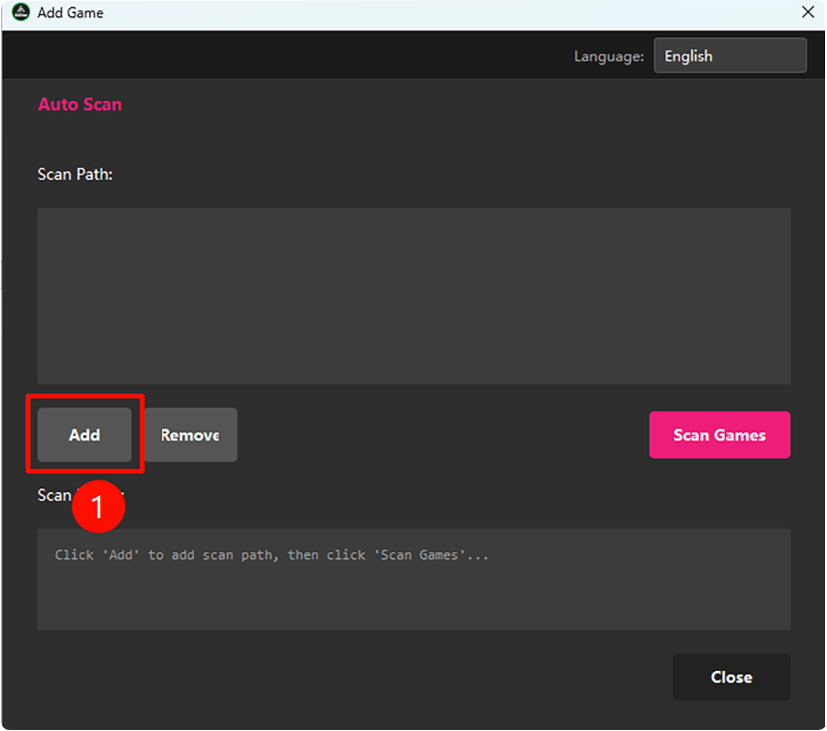
  • Open GAM Mod Manager
  • Update GAM Mod Manager when prompted
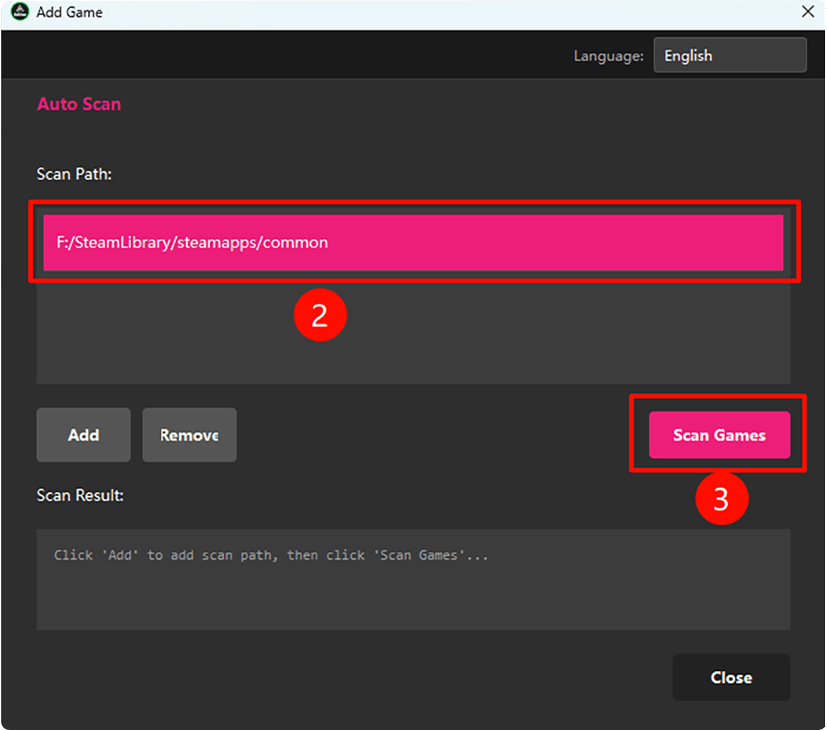
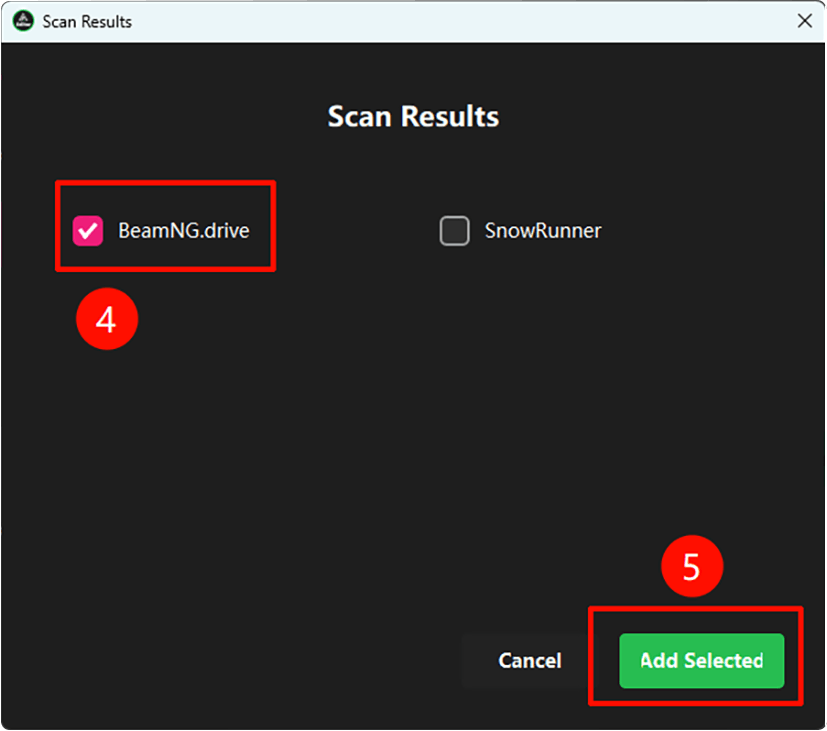
  • Add a supported game, e.g. SnowRunner
  • After adding, the Editor button will appear in the top menu bar
  • Click the Editor button — it will auto-download required config files
  • The editor will launch automatically after download

If you haven't downloaded GAM Mod Manager yet, click the button below

Not supported: MacOS Linux

GAM模组管理器

GAM Vehicle Editor
Professional Game Vehicle Parameter Editor

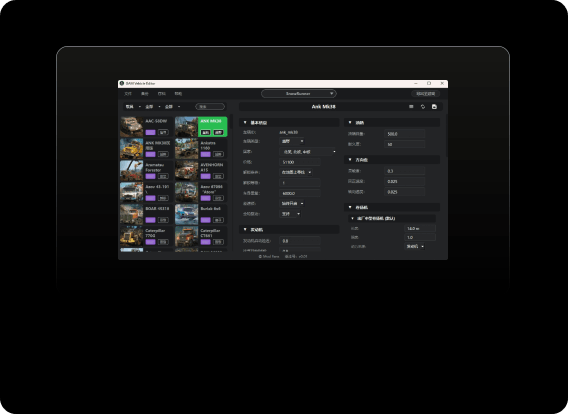
GAM Vehicle Editor 是一款专为游戏玩家设计的车辆属性可视化编辑工具,支持雪地奔驰(SnowRunner)、BeamNG.Drive 等游戏,无需手动修改代码即可调整悬架、发动机、变速箱等数十种参数,修改完成后一键导出至游戏目录,内置自动备份保护原始文件。

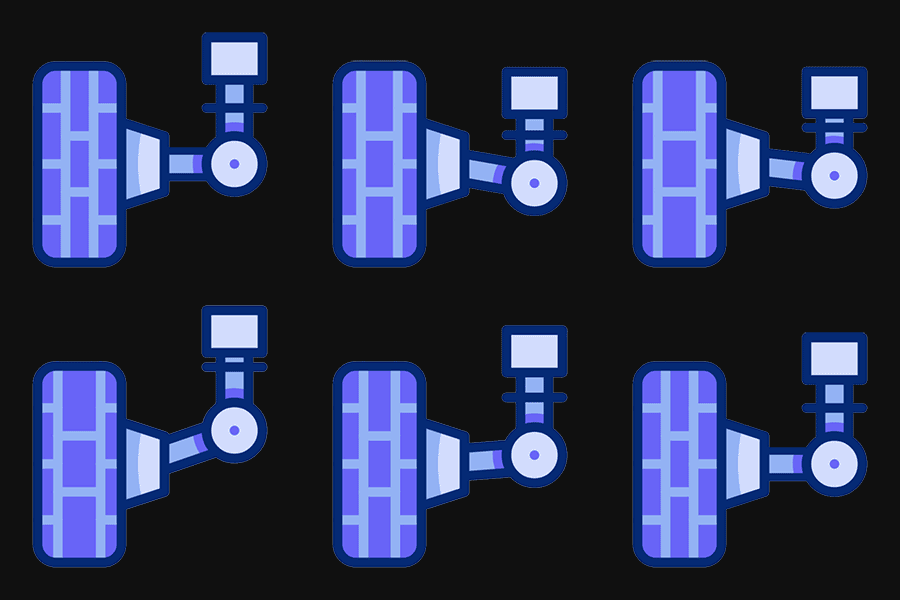
suspension motor disc-brake

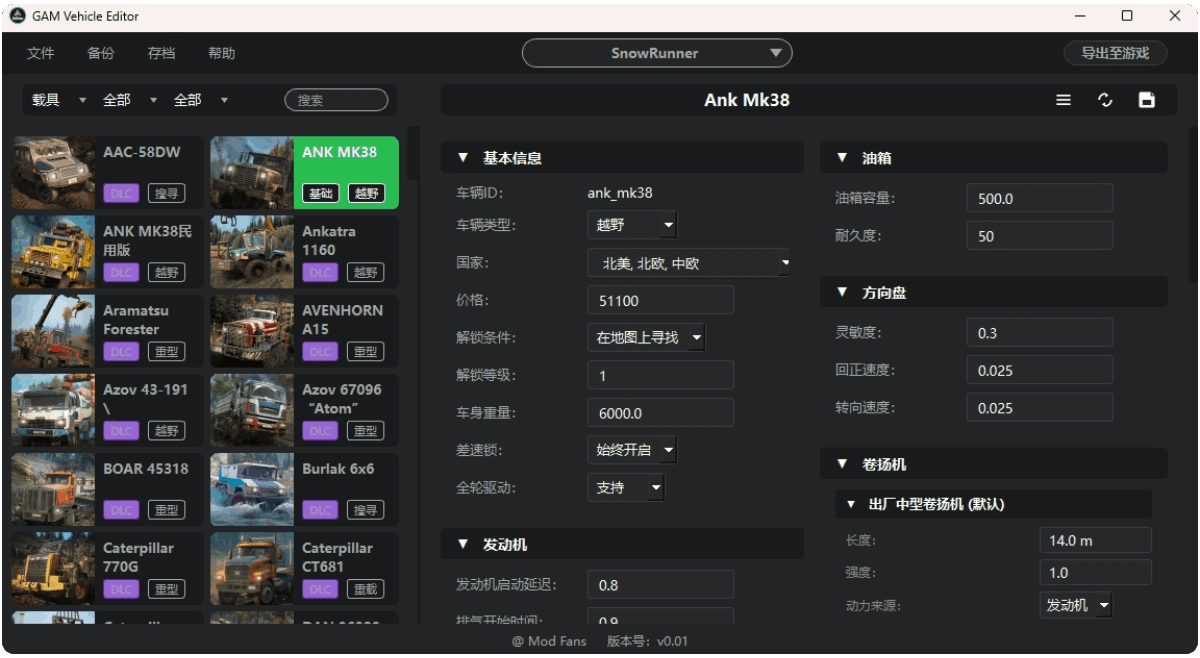
Visual Editing

  • All vehicle parameters displayed with labeled UI — no code editing required
  • Supports engine, tires, suspension, gearbox and dozens of other parameters
编辑器界面截图

One-Click Export

  • Export to game directory with one click — changes take effect immediately
  • Auto-validates parameters before export to prevent game crashes
一键导出

Smart Caching

Fast reads, instant startup

Auto-cached after first load,
instant startup from then on

Smart detection after export,
avoids redundant re-reads

Auto re-reads on game update,
always stays up to date

First open

Subsequent opens

Multi-Game & Multi-Platform

Broad compatibility with major platforms and games

多游戏支持

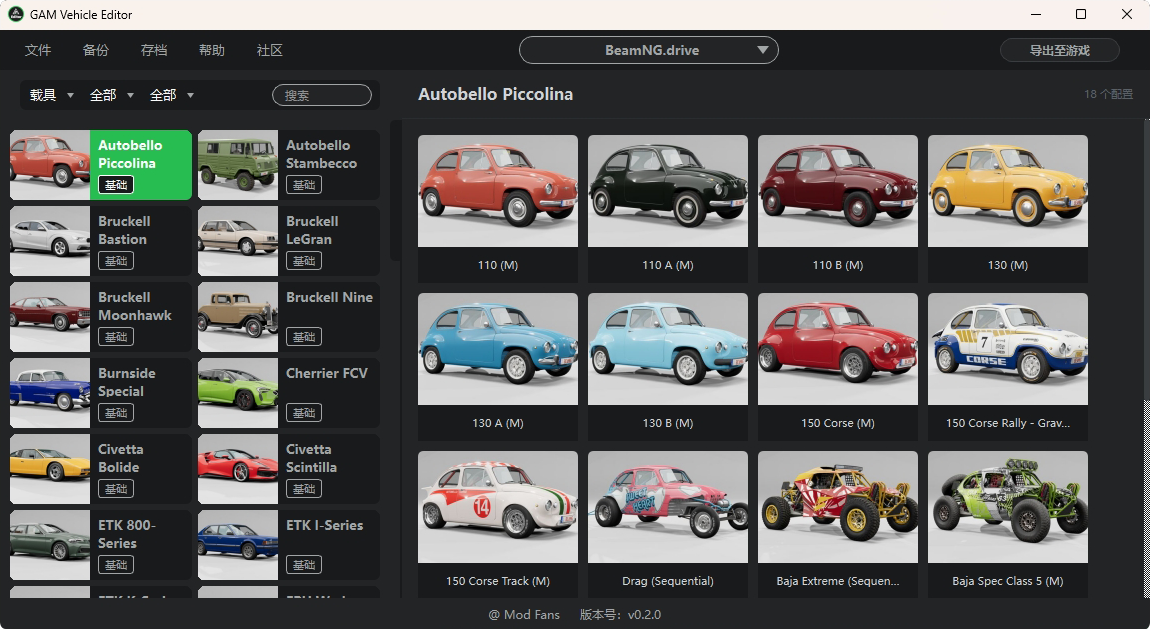
Multi-Game Support

Supports SnowRunner, BeamNG.Drive, with more games coming soon

多平台支持

Multi-Platform Support

Supports games on Steam, Epic and more

统一 UI 框架

Unified UI Framework

Independent config per game, consistent UI design

Safe Backup System

Multiple protections, mod with confidence

Auto-backup on first run

A full backup of your game files is created on first launch, keeping originals safe.

Multiple named snapshots

Create multiple backup versions for different mod setups, switch between them anytime.

Restore any version instantly

Not happy with a change? Restore to any previous backup point in one click, zero risk.

FAQ

Answers to common questions

FAQ
Do I need to purchase the game to use this editor? +

Yes. This editor is only for modifying game assets you have legally obtained. Please ensure you own a valid license for the game.

Will modified files affect multiplayer? +

No impact in single-player mode. In multiplayer, some servers may detect and restrict modified vehicles. We recommend using it in single-player only.

Will my modifications be lost after a game update? +

Major game updates may overwrite modified files. We recommend re-exporting your save after each game update, then using the Load Save feature to restore previous modifications.

Can the export limit be removed? +

Upgrading to a membership unlocks unlimited exports, along with advanced features like saves and snapshots.

Does it support other games? +

Currently supports SnowRunner and BeamNG.Drive at launch. Support for more games will be added gradually.

"Game installation directory not found" after switching games? +

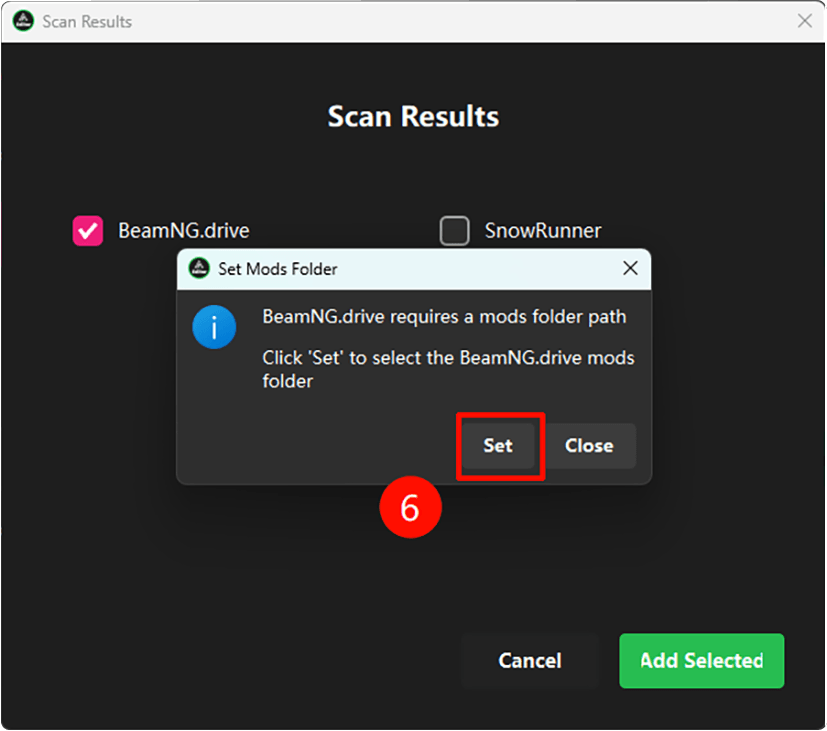
Please add the game in the GAM main application first. The editor reads game paths from GAM configuration. For BeamNG.Drive, make sure the mod deployment path is configured correctly.

The editor cannot detect installed mods? +

For BeamNG.Drive, make sure the mod deployment path is set. Other games set it automatically after being added, so no manual configuration is needed.

No changes appear in-game after editing? +

After editing, save the parameters first, then click "Export to Game". Make sure the game is closed before exporting, otherwise the export will have no effect.

How is GAM Vehicle Editor different from editing game files directly? +

Directly editing game files requires locating config files and writing code - error-prone and hard to undo. GAM Vehicle Editor provides a visual interface, auto-backup before editing, and one-click restore, greatly reducing the risk of mistakes.

How do I use the SnowRunner / BeamNG.Drive vehicle editor? +

After adding the game in GAM mod manager, click the "Editor" button in the top menu to launch it. The editor scans all vehicles automatically. Select a vehicle to adjust parameters, then click "Export to Game" to apply changes instantly.

Which tool is recommended for modifying BeamNG.Drive vehicles? +

GAM Vehicle Editor supports visual editing of BeamNG.Drive vehicle parameters - suspension, engine, tires - with auto-backup before changes, never corrupting original game data, and supporting reset to defaults at any time.

System Requirements

Recommended hardware to run GAM Vehicle Editor

Component
Minimum
Recommended
CPU
4 cores (post-2016)
8 cores or more
RAM
4 GB available
8 GB available
Disk Space
2 GB free
5 GB free (SnowRunner temp + BeamNG + backups)
Disk Type
HDD (slower)
SSD strongly recommended (3–10x faster cache I/O)
OS
Windows 10
Windows 11
Dependencies
WinRAR (required for SnowRunner)

Legal & Compliance

Terms of Use Summary

  • Permitted: personal use, study, research, and appreciation
  • Prohibited: redistribution, reverse engineering, commercial use, or removing copyright notices
  • Reminder: comply with game EULA; single-player use only

Full Policies

Copyright Registration

  • Copyright registration applied
  • ModFans Development Team
  • Closed source. All rights reserved.